Skip to content
  • There are no suggestions because the search field is empty.
πŸ”’ Gated article β€” sign-in was required to view this article.

Rest Plugin Setup for Vantage Integration πŸ‘©β€πŸ”¬

Example Imagen workflow setup for calling Vantage workflow via REST plugin

Β 

Introduction

Media will be sent through our Vantage integration via the REST plugin. This is a guide to creating a new workflow that will send data to and receive data from Vantage.

Overview

Stage One

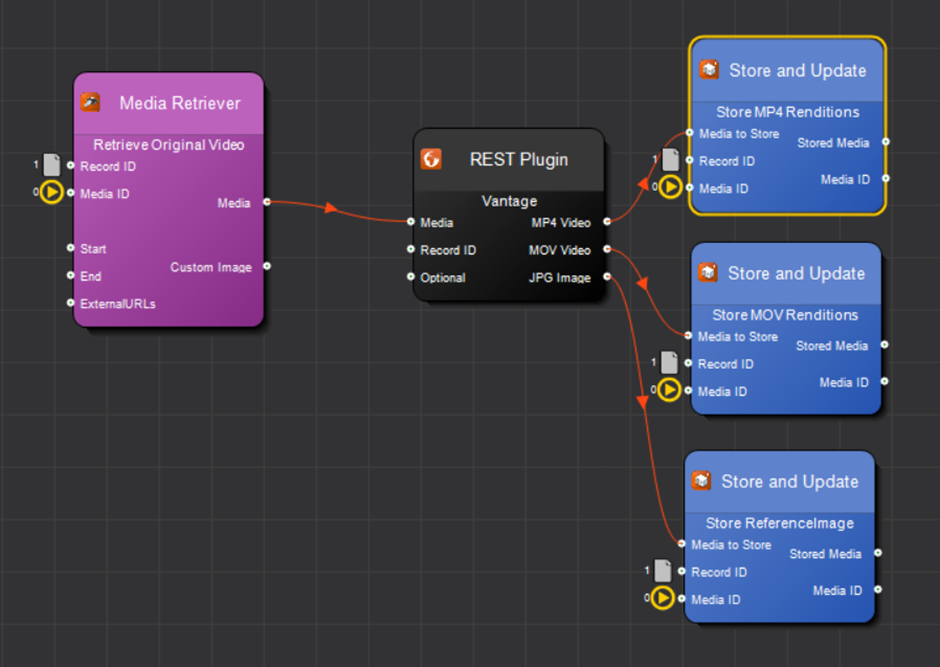
The first stage of this workflow is to retrieve media from a storage profile supported by Vantage. This should be the 'Original Video' profile by default.

Β  Vantage supported file types


Stage Two

Imagen REST plugin will be added to the workflow to call the Vantage Azure function application. The function will then poll for progress.


Stage Three

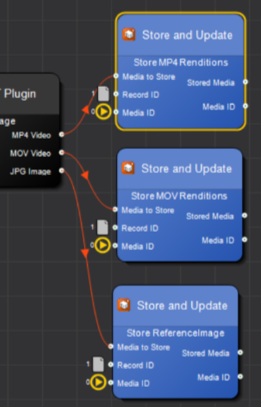
The final stage is to take the Vantage outputs from the REST plugin and route the data to relevant storage profiles. The store and update plugins will be used to finish the workflow


Workflow Screenshot

Setting up REST plugin properties

Submitting Jobs
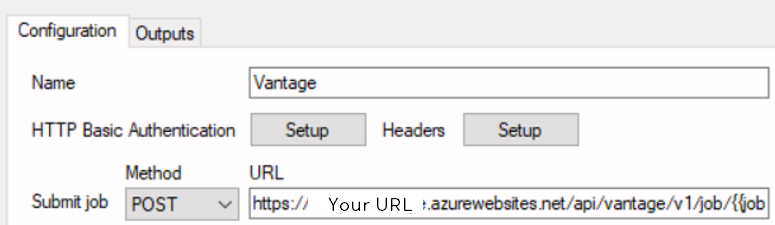
To allow the plugin to submit jobs set the HTTP method to POST and callΒ 

 /api/vantage/v1/job/ 

The function requires the Imagen Job ID, so it is passed as a parameter .Β 

will be replaced by the REST plugin with the Imagen job id

For example, you would set the URL to:

https://your_Azure_function_url/api/vantage/v1/job/?code=azure_access_code

Cancelling Jobs

To enable job cancellation, use exactly the same URL but with HTTP method set to DELETE.

For example, you would set the URL to:

https://your_Azure_function_url/api/vantage/v1/job/?code=azure_access_code

Progress Polling

To enable job progress polling, set HTTP method to GET and call the /api/vantage/v1/job/progress function passing in as the final parameter as before.

For example:

https://your_Azure_function_url/api/vantage/v1/job/progress/?code= azure_access_code 

β€˜Output result as media objects’ checkbox should always be checked for Vantage workflows.

β€˜Delay initial progress call’ should be set to several seconds for Vantage as there is often a delay between a job being accepted by Vantage and the same job appearing in job search results from Vantage.


Setting up the job body

<?xml version="1.0" encoding="utf-8"?>
<Job>


<Variables>
Β Β Β  Β Β Β Β Β Β Β Β Β Β Β  <Variable>
Β Β Β Β Β Β Β Β Β Β Β Β Β Β Β Β Β Β Β Β Β Β Β Β Β  Β Β Β Β Β  <Name>File Name</Name>
Β Β Β Β Β Β Β Β Β Β Β Β Β Β Β Β Β Β Β Β Β Β Β Β Β Β Β Β Β  Β  <Value>myfile.mp4</Value>
Β Β Β Β Β Β Β Β Β Β Β Β Β Β  </Variable>
</Variables>
</Job>

will insert the input Imagen media object XML into the job body.

⚠️ Warning: Jobs will fail if this is not present as it's required by the azure function app

πŸ’‘ Pro Tip: The Variables section is optional and should only be used if the Vantage workflow requires input variables.

In this case, the Vantage workflow has a variable enabled on it named β€˜File Name’.

We recommend specifying a filename which includes the job ID so that files don’t overwrite or clash with each other Vantage Jobs running simultaneouslyΒ 

<Variable>
Β  Β <Name>File Name</Name>
Β  Β <Value>.mp4</Value>
</Variable>

Setting up headers

Click the β€˜Setup’ button next to β€˜Headers’ on the main interface, this will display the Header form
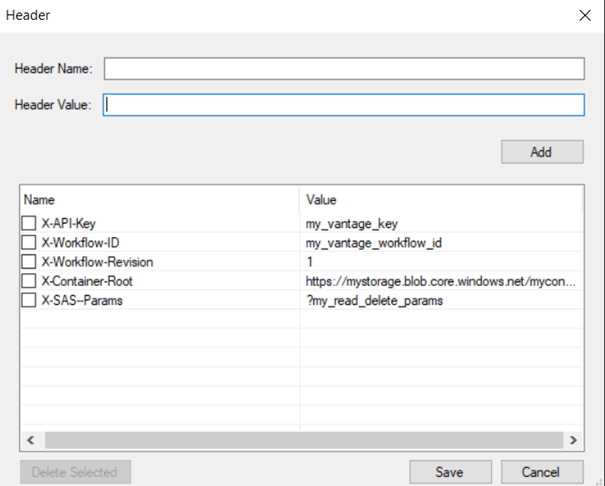
X-API-Key is the standard Vantage API key header.

X-Workflow-ID is used for setting which Vantage workflow to call.

X-Workflow-Revision is optional and is used only if a specific workflow revision is required.

X-Container-Root is the root container path for expected output files. The Azure function will use this in combination with workflow job filename results when outputting results back to Imagen.

X-SAS-Params should be set to SAS params with READ and DELETE access to the output container, the Azure function will add these params to the output URLs when outputting results back to Imagen.

Setting up expected outputs

Click on the β€˜Outputs’ tab on the main interface

Β 

Β 

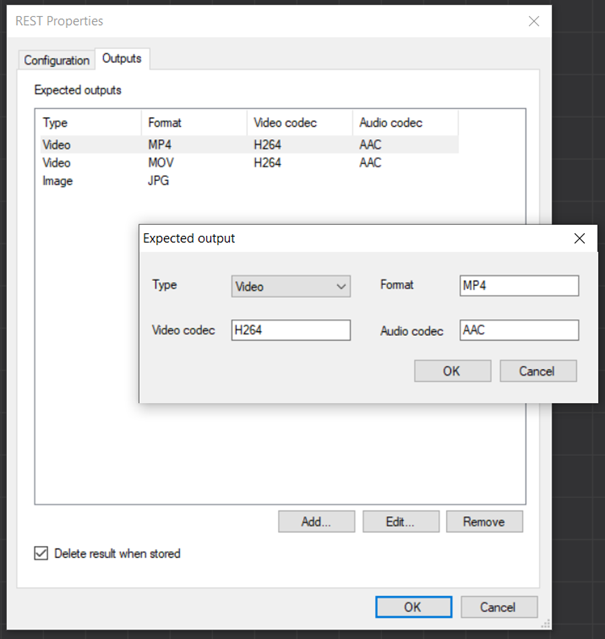
The Imagen workflow needs to know what the expected outputs are in the exact order they will return from theΒ Vantage workflow job.

It can then set up output pins on the REST properties (Right) which in turn can be connected to Store and Update properties, so the resulting files are stored to the correct Imagen Storage Service profile.

For each expected output, specify the media type (Video/Audio/Image etc) and optionally the expected container format, video codec and audio codec (if appropriate for the media type).

Accessibility πŸ‘Welcome to Imagen!Automated transcription (Speech-to-Text) πŸ‘¨β€πŸŽ“Welcome to Imagen!Developers' Guide πŸ“• πŸ”’Welcome to Imagen!How We Can Help You Onboard Your Content πŸ“•Welcome to Imagen!Introduction to Imagen πŸ“•Welcome to Imagen!Onboarding Guide πŸ“•Welcome to Imagen!The Imagen Transcoder Farm πŸ“•Welcome to Imagen!The Imagen Video Player πŸ“•Welcome to Imagen!Storage Availability πŸ€”Welcome to Imagen!Storage Options πŸ€”Welcome to Imagen!Storage Security πŸ€”Welcome to Imagen!Which Theme Is Right for Me πŸ€”Welcome to Imagen!Why Is User Experience So Important? πŸ€”Welcome to Imagen!Imagen Term Glossary πŸ“°Welcome to Imagen!Supported Browsers πŸ“°Welcome to Imagen!Video Player Keyboard Shortcuts πŸ“°Welcome to Imagen!What is a Media Object Timeline πŸ‘©β€πŸŽ“Welcome to Imagen!Newbie Checklist πŸ‘‹Welcome to Imagen!Activity History ⚑FindGoogle Analytics πŸ‘©β€πŸŽ“FindAdding Annotations to Your Video Content ⚑FindAnnotation Layers πŸ“•FindAnnotations GuideπŸ“•FindExporting Annotations ⚑FindGenerate Subtitles for Audio Content ⚑FindGenerate subtitles for video content ⚑FindGrouping Annotations on Export ⚑FindImagen Subtitle Guide πŸ“•FindReordering Objects Within a Collection πŸ“•FindCustom ReportingFindHow can I see the Open-Source Programming Languages used by Imagen? πŸ€”FindIf I search on the homepage, I get one type of search URL. But I get a different kind of URL on the "Search Results Page" πŸ€”FindMy search results seem out of date ⚠️FindWhat metadata does Imagen extract from my video content? πŸ€”FindImagen Query Language - Media Viewer Widget ⚑FindImagen Query Language Reference πŸ“°FindUnderstanding Imagen Query Language πŸ‘¨β€πŸ«FindArtificial Intelligence ServicesFindDescriptive Metadata Fields πŸ“•FindExtracting Image Metadata on Import ⚑FindField Types and Record SchemaΒ πŸ“•FindImagen Query Language - Related Records View ⚑FindImagen Query Language Guide πŸ“•FindImagen XML Schema Mapping (XSLT) πŸ“•FindSingle/multi-select fields - remote validationFindActivate a Language license ⚑FindChange My Default Language ⚑FindDisplay Multilanguage Annotations ⚑FindHow to configure multilanguage logos ⚑Findlanguage packs πŸ“•FindCreating Parent/Child Field DependenciesFindDeleting RecordsFindRecords & Media Objects πŸ“•FindUpdating Records ⚑FindAdd Fields to the Search Index ⚑FindAdding a filter to the search page ⚑FindAdvanced Search Reference πŸ“°FindSaved Searches πŸ“•FindSearch Index Guide πŸ“•FindUpdating the Imagen Search Index ⚑FindBespoke Ingestion πŸ“•StoreWhat is a 'Watchfolder'? πŸ“•StoreImport from Dropbox ⚑StoreImport from OneDrive ⚑StoreUsing the Record (XML) Import Widget ⚑StoreCan non-media file types still be uploaded to Imagen?πŸ€”StoreCreate a record with media ⚑StoreCreate an empty record with metadata ⚑StoreCreate Imagen XML in Excel πŸ‘©β€πŸŽ“StoreCreateΒ multiple records, each with a single piece of media ⚑StoreImagen Media Workflows πŸ“•StoreImport Media from a URL ⚑StoreMedia Import and Ingestion πŸ“•StoreOptions for Onboarding your Metadata and Media πŸ€”StorePFR (Partial File Restore) and Segments πŸ“•StoreWhat information do you store about my video during ingest? πŸ€”StoreBurnt-in Timecodes (BITC) πŸ“•StoreThe Imagen Image Editor ⚑StoreWatermarking ⚑Store.PDF ViewerStoreAdd a Document Viewer ⚑StoreConfiguring Amazon S3 Intelligent-TieringStoreStorage Costs πŸ“•StoreStorage Profile Reference πŸ“„StoreStorage Replication 🌐StoreSupported File Types πŸ“°StoreConfiguring Amazon S3 Storage TutorialStoreConfiguring Wasabi Storage TutorialStoreStorage LocationsStoreWhy Has My Media Failed to Ingest to Wasabi? πŸ€”StoreConfiguring "Download Profiles" ⚑DistributeInstalling and Using Imagen Accelerated File Delivery (AFD) ⚑DistributeOrdering Clips on Behalf of Other Users πŸ“•DistributeEdit Live Stream Notification Emails ⚑DistributeImagen Live Connect API πŸ“°DistributeAd-hoc PaymentsDistributeIntroduction to Content Licensing πŸ“•DistributePrep: Imagen License and Stripe Accounts ⚑DistributeShopping Basket ConfigurationπŸ“„DistributeShopping BasketsΒ πŸ“•DistributeSubscription Configuration ⚑DistributeSubscription Overview πŸ“•DistributePOST /iweb/v1/notification πŸ“°DistributeAnonymous Sharing Links to Collections (Septeber Release)DistributeCollections πŸ“•DistributeEmbedding Media on External SitesDistributeShare media with unregistered usersDistributeSocial Media PublishingDistributeSunrise/Sunset Dates for Open Access Links ⚑DistributeCreate an MRSS Feed ⚑DistributeImagen Live Connect πŸ“•DistributeImagen MRSS Feed Response πŸ“°DistributeOver the top (OTT) Delivery πŸ“•DistributeBatch Editing Record & Media ACLManageCustom ACLsManageSet When Your Users Can Access Your Content ⚑ManageSetting Default Access Control Lists (ACL) for Records, Media, and Collections ⚑ManageSetting Record & Media Access Control Lists (ACL)ManageWhat are "ACLs"? πŸ€”ManageChanging Your Theme ⚑ManageDisplay banners on your site πŸ‘©β€πŸŽ“ManageI want to add a theme, which is right for me πŸ€”ManagePreview a theme before you commit ⚑ManageAdding Users to Groups ⚑ManageSet Permissions for a Group of Users ⚑ManageDynamic form ⚑ManageImagen Query Language - The Carousel Widget ⚑ManageMap Viewer Widget ⚑ManageWidgets πŸ“•ManageAdobe Premiere Pro IntegrationManageCache Page πŸ“„ManageCookies Page πŸ“°ManageDisplay Fields πŸ“„ManageEmail πŸ“„ManageEnvironment PageπŸ“°ManageFederations πŸ“°ManageGeolocation database πŸ“°ManageGlobal Settings Page πŸ“„ManageHealth Check Page πŸ“°ManageMailing List πŸ“„ManageMaintenance Mode πŸ“„ManageThe Imagen Admin Interface Directory πŸ“‹ (Private)ManageUpdate Page πŸ“°ManageUser Intelligence πŸ“•ManageCreate an OrganisationManageAdding users to user groups through organisations ⚑ManageConfiguring Federated SSO ⚑ManageConfiguring your SSO service provider ⚑ManageGuide to SSO πŸ‘©β€πŸ«ManageI'm being sent back to ImagenWeb from the IDP but I can't get any further πŸ€”ManageCustom Cookie Policy (Javascript) TutorialManageImagen Event ServiceManageBanning a User from Site Access ⚑ManageClear Users That Have Not Been ValidatedManageCreate a Custom Registration ProcessManageCreating Custom Registration FieldsManageCreating request/approval relationships ⚑ManageCustomizing your Login Page ⚑ManageGrant a User Administrator PermissionsManageGrant a User Developer PermissionsManageGranting Site Permissions to an Individual User ⚑ManageGuide to Building Access Control πŸ“•ManageIntroduction to Users, Groups, and Organisations πŸ“•ManageManage Permissions with Imagen πŸ“•ManagePreview Only AccessManageRestrict user sign-ups by geographyManageSetting User Signup RulesManageUser Permissions πŸ“°ManageHow do I add reCAPTCHA to my Imagen siteManageCore REST Interface πŸ“°DevelopersGET /api/v1/endpoints πŸ“°DevelopersGet /core/v1/application πŸ“°DevelopersGET /imcc/v1/job/list πŸ“°DevelopersGET /licenceStatus/πŸ“° WIPDevelopersGET /user/ πŸ“°DevelopersGET history πŸ“°DevelopersGET imcc/v1/job/count πŸ“°DevelopersGET job/searchπŸ“°DevelopersGET rights πŸ“°DevelopersPut /imcc/v1/job πŸ“°DevelopersAuthentication via Signed StringπŸ“°DevelopersHow to authenticate API calls with a Bearer token πŸ“°DevelopersCreating an Application in Imagen ⚑DevelopersGaining a Bearer Token ⚑DevelopersGET /iweb/v1/search πŸ“°DevelopersImagen API Documentation πŸ“• πŸ”’DevelopersGET /iweb/v1/notifications πŸ“°DevelopersGET Profiles πŸ“°DevelopersExample MRSS Reader (Powershell) πŸ“„DevelopersImagen XML Reference πŸ“°DevelopersNew metadata-only record with no media πŸ“°DevelopersNew record with a single piece of media πŸ“°DevelopersNew record with multiple pieces of mediaπŸ“°DevelopersRecord update adding new mediaπŸ“°DevelopersRecord update with metadata only πŸ“°DevelopersSet ACL by XML πŸ“°DevelopersGET /import/record πŸ“°DevelopersGET /iweb/v1/download πŸ“°DevelopersPUT /import/record/ πŸ“°DevelopersCreating a Video Record with the Imagen API πŸ‘©β€πŸ«DevelopersFind the UMID of a media file πŸ‘©β€πŸ«DevelopersHow to find an Import Record (job) GUID πŸ‘©β€πŸ«DevelopersHow to find your Media Control Centre FQDN ⚑ πŸ”’DevelopersHow to find your media ID πŸ‘©β€πŸ«DevelopersHow to Find Your Resource Group Name πŸ‘©β€πŸ«DevelopersProgrammatic API Call Examples πŸ“°DevelopersScopes πŸ“°DevelopersStandard Failure Response πŸ“°DevelopersWhat is a job priority? πŸ‘©β€πŸ«DevelopersDELETE /import/record/ πŸ“°DevelopersDELETE /media πŸ“°DevelopersGET /iweb/v1/users πŸ“°DevelopersWebhooksDevelopersXML Watch Folder Tutorial (Lambda) πŸ”’Partners & InternalDELETE /imcc/v1/media/ πŸ“° πŸ”’Partners & InternalDELETE /imcc/v1/record/ πŸ“° πŸ”’Partners & InternalDELETE imcc/v1/import/record/ πŸ“° πŸ”’Partners & InternalGET imcc/v1/import/record/ πŸ“° πŸ”’Partners & InternalGET imcc/v1/record/search πŸ“° πŸ”’Partners & InternalGET record/validateSearch πŸ“° πŸ”’Partners & InternalPUT imcc/v1/import/record/ πŸ“° πŸ”’Partners & InternalAdd a Video Player ⚑ πŸ”’Partners & InternalAdd an Audio Player ⚑ πŸ”’Partners & InternalAdd an Image Viewer ⚑ πŸ”’Partners & InternalMake a clip from a live feed in progress ⚑ πŸ”’Partners & InternalImagen Deployment Tutorial πŸ”’Partners & InternalWatchfolder Tutorial (Azure Function Media Uploaded Trigger) πŸ”’Partners & InternalWatchfolder Tutorial (Azure Function XML Uploaded Trigger) πŸ”’Partners & InternalOnboarding Playbook πŸ”’Partners & InternalJob and File Status Codes πŸ“„ πŸ”’Partners & InternalAdd a subtitles workflow to Imagen ⚑ πŸ”’Partners & InternalCreate a New Empty Workflow ⚑ πŸ”’Partners & InternalRest Plugin Setup for Vantage Integration πŸ‘©β€πŸ”¬ πŸ”’Partners & InternalWatch Folder With FTPS Tutorial πŸ‘¨β€πŸ« πŸ”’Partners & InternalXML Watch Folder Tutorial (Windows) πŸ”’Partners & Internal