Skip to content
  • There are no suggestions because the search field is empty.

Widgets πŸ“•

Customise your user experience with easy to build and customise 'Widgets'

  1. Introduction
  2. Carousel
  3. Custom HTML
  4. Dynamic Form
  5. Image Viewer
  6. Image With Template
  7. Language Picker
  8. Map Viewer
  9. Media Viewer
  10. Record Importer
  11. Response Grid
  12. Search Bar
  13. Social Viewer
  14. Spacer
  15. Template
  16. Twitter Timeline
  17. Video Player
  18. On this day

Introduction

Widgets allow you to easily build components to place around your platform to enhance your end user’s experience. No prior coding skills are needed to configure widgets, as these have been created with user-friendly interfaces

Β 


Carousel

Cycle through media in many attractive styles
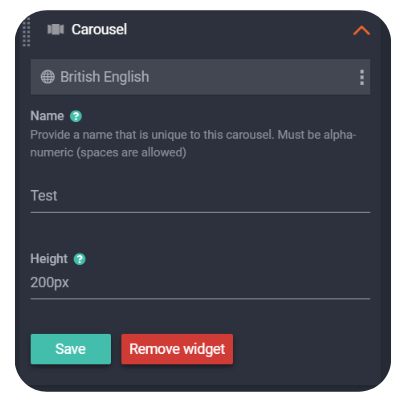
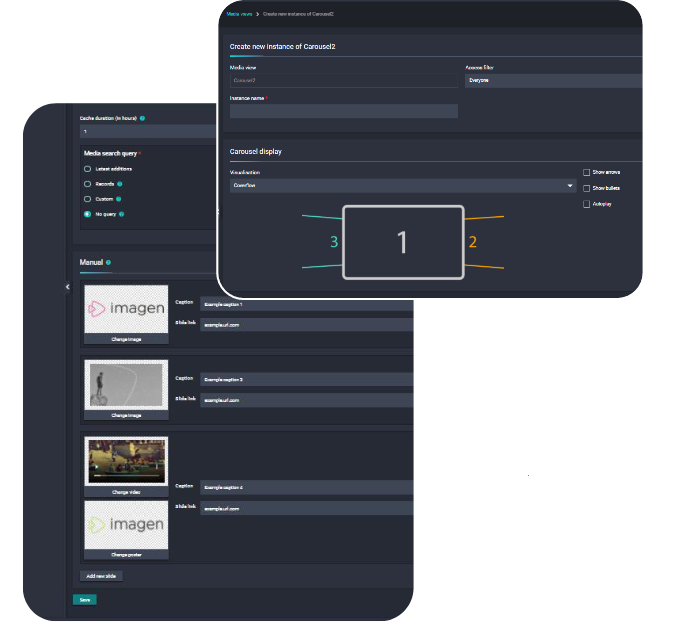
Allows for the display of slideshows with multiple images or records. These slideshows are created as Carousel2 media view instances within the Admin panel (Admin > Customisations > Media view instances > Manage media view instances). Visualisation options: Single, Centered-Scrolled, Fade, Coverflow, Paged-ScrolledMedia Search Query options: Latest record additions, specific record IDs, custom query
Β 
Β 

πŸ’‘Pro Tip: Follow this guide to create a Carousel


Custom HTML

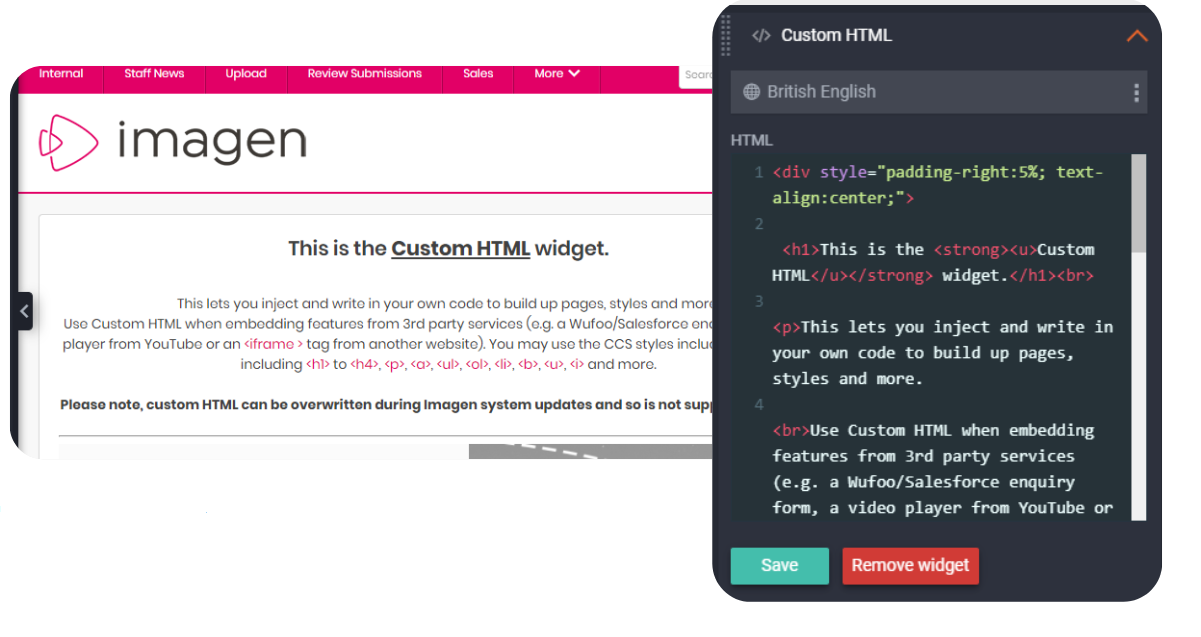
This lets you inject and write in your own code to build up pages, styles and more

Use Custom HTML when embedding features from 3rd party services (e.g. a Wufoo/Salesforce enquiry form, a video player from YouTube or an <iframe> tag from another website). You may use the CSS styles included in your theme, including <h1> to <h4>, <p>, <a>, <ul>, <ol>, <li>, <b>, <u>, <i> and moreΒ 

⚠️ Warning: Custom HTML is not supported by Imagen and may be overwritten during system updates. Additionally, early access to code updates will not be provided. 


Dynamic Form

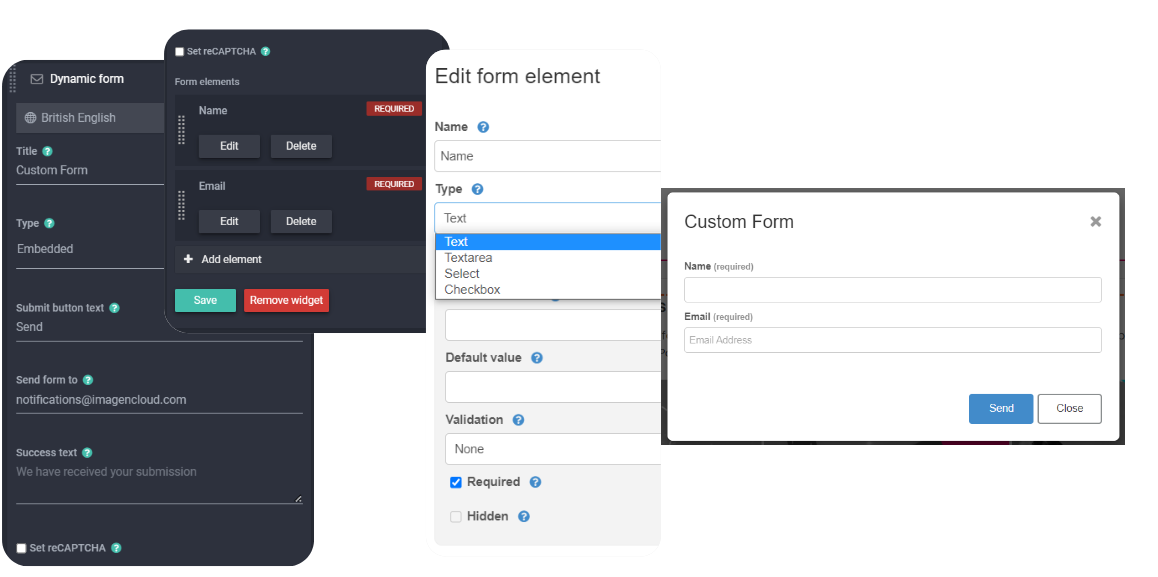
Allows you to create an enquiry form which can be embedded within the visible widget area or configured behind a pop-out modal tied to a button. You can decide which fields to configure to collect information if these are required, their format (drop-down, free text, etc.) and configure messages after submission. Some additional information is also automatically collected –username and page URL if on custom pages, and details about the media file as well if added to a record page
Β 

Β 

πŸ’‘Pro Tip: Follow this guide to create a dynamic form
Β 

Image Viewer

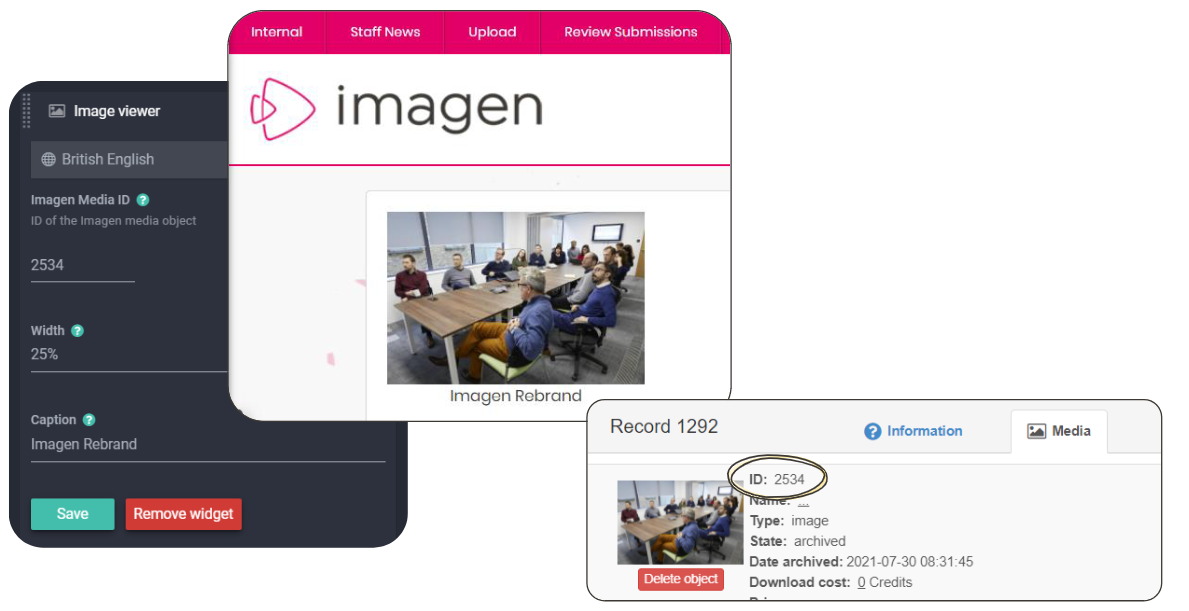
Allows for the display of an Image hosted in your Imagen platform.
Β 

⚑ProTip: Note: Imagen Media ID can be found via the Edit Record button on a Record page and by selecting the Media tab


Β 

Β 

Image with Template

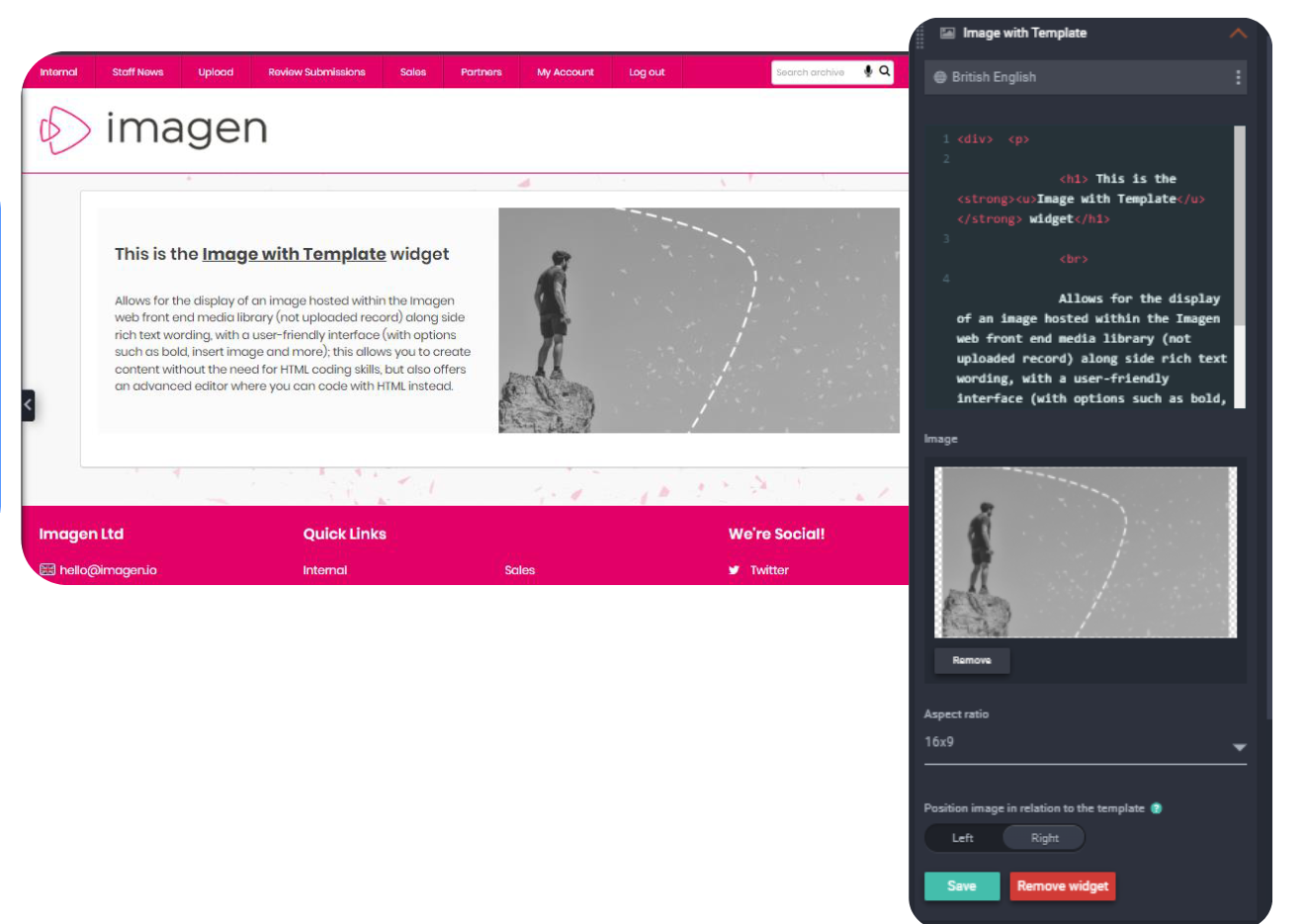
Allows for the display of an image hosted within the Imagen web front-end media library (not uploaded record) alongside rich text wording, with a user-friendly interface (with options such as bold, insert image and more); this allows you to create content without the need for HTML coding skills but also offers an advanced editor where you can code with HTML instead

Β 

Β 

Language Picker

Allows you to insert a language picker widget that updates a user’s preferred display language if your platform configures additional languages. Additional languages need to be added via Admin > Site Configuration > Language > Languages
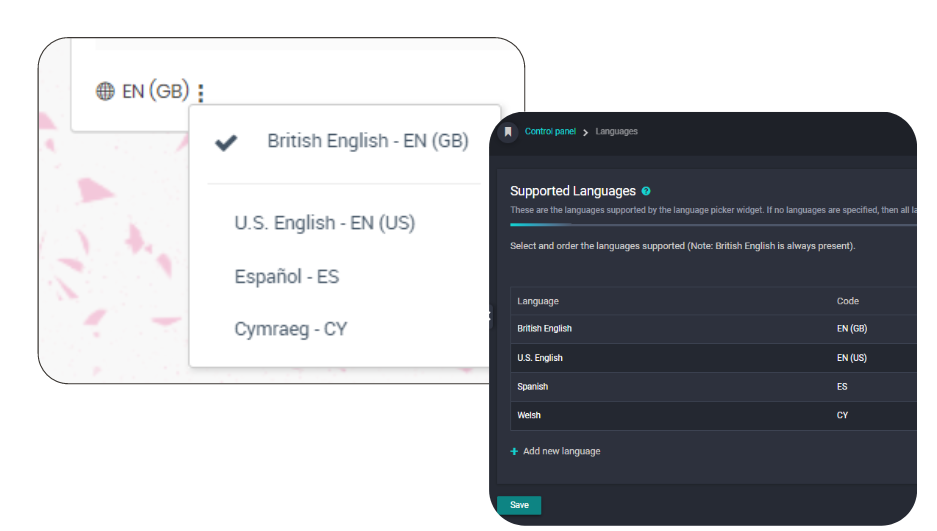
⚑Pro Tip: Languages can only be added by purchasing an additional language pack and only translating core platform language. Follow this link to find out more


Β 

Β 

Map Viewer

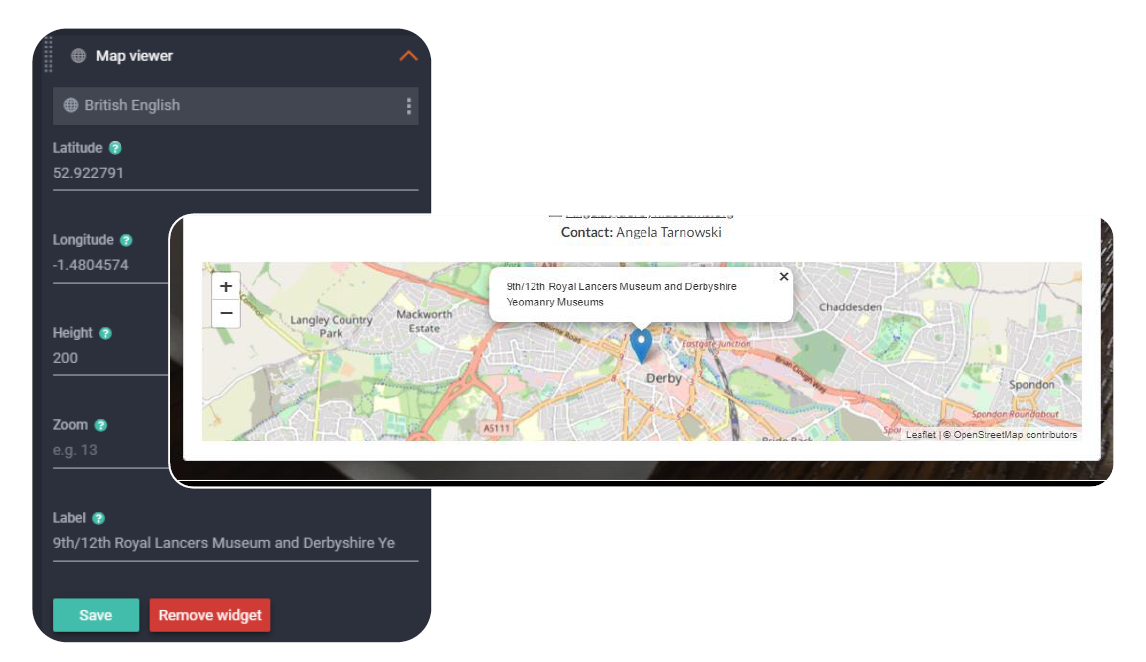
Enables you to display a pin with a label on a map, using Longitude and Latitude coordinates and setting a zoom level. Ideal for providing exact locations
πŸ’‘Pro tip: Follow this guide to create a map viewer


Β 

Β 

Media Viewer

Allows you to show records to users based on certain criteria (e.g. Latest Additions) which will only show results to users based on their access rights (Record & Media Privacy settings). Image tiles play the video when hovered over.
Media Search Query options: Latest additions, specific record IDs, custom query & latest created news items
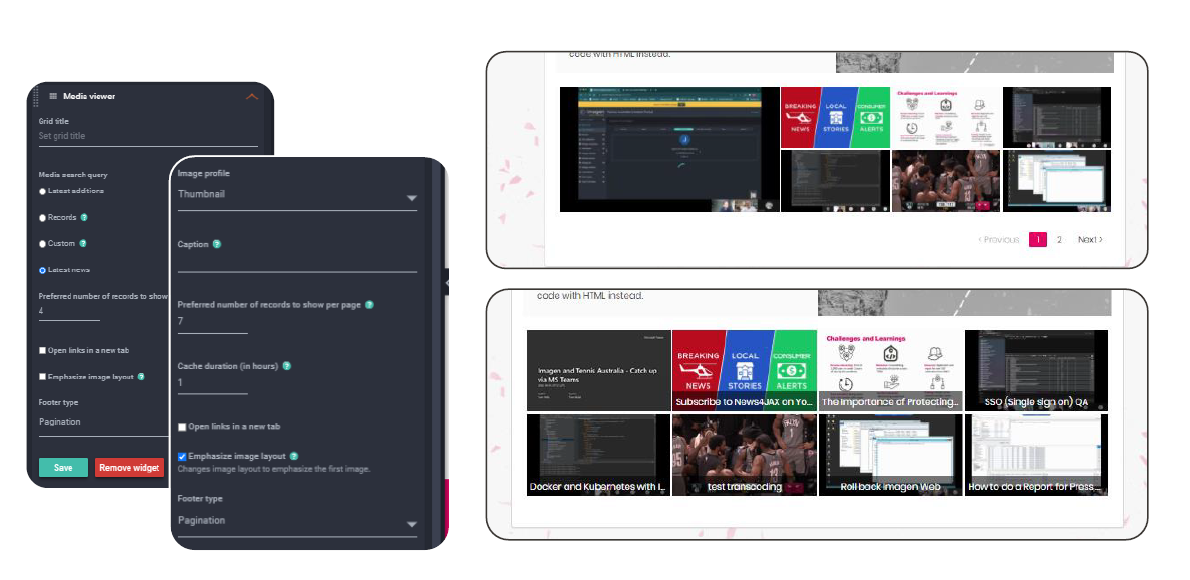
πŸ’‘Pro tip: follow this guide to set up a Media Viewer


Β 

Β 

Record Importer

Provides a user
facing tool to batch import XML data to create records and pull in media from publicly available URLs. When checking the Import Media box available Workflows to the user are also displayed in a dropdown
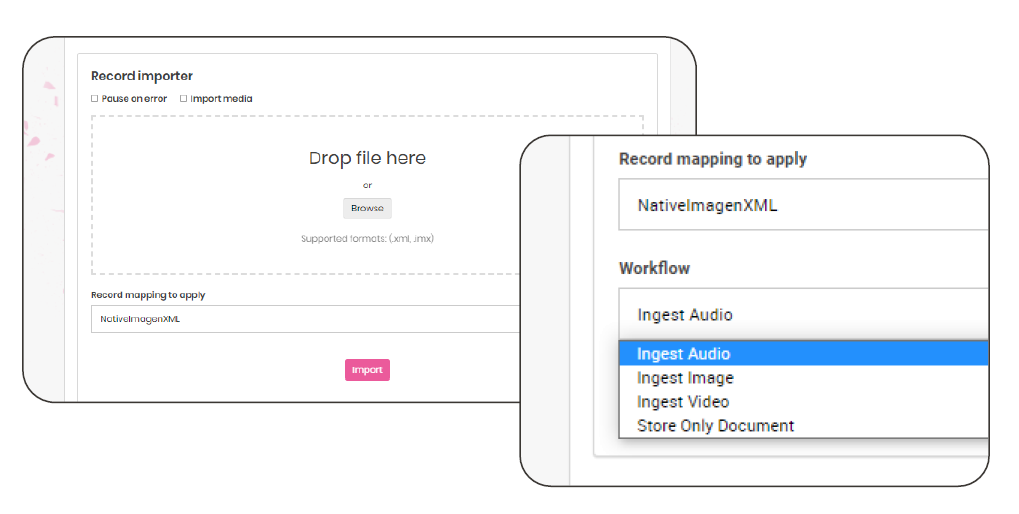
πŸ’‘ Pro tip: Follow this link for a guide to using the Record Importer


Β 

Β 

Responsive Grid

Allows you to easily create a visual grid of images or icons to link to pages on your website or other websites.Β Options include: Aspect Ratio, items per row, zoom-in (hover
over), caption hide/overlay/centre, black & white (with URL image will become coloured when hovered over)
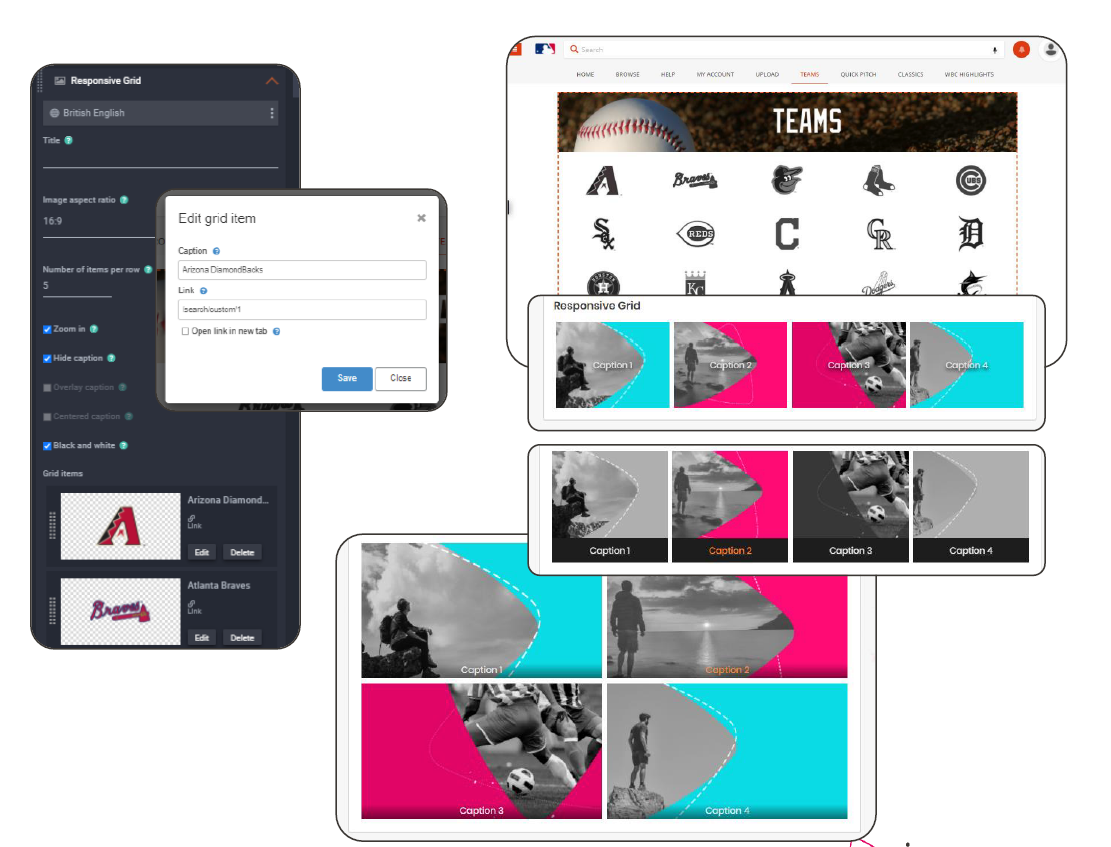

Β 

Β 

Search Bar

The search bar allows you to easily place a search bar set to search the whole site or be limited to specific custom pages. Includes full saved search functionality plus quick links to user's Records, Segments and Collections
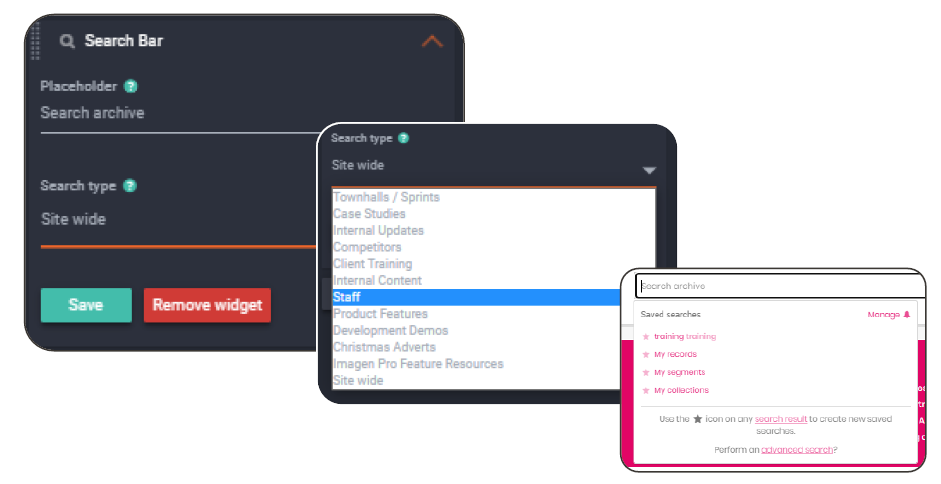

Β 

Β 

Social Viewer

Quickly allows the embedding of a social media post
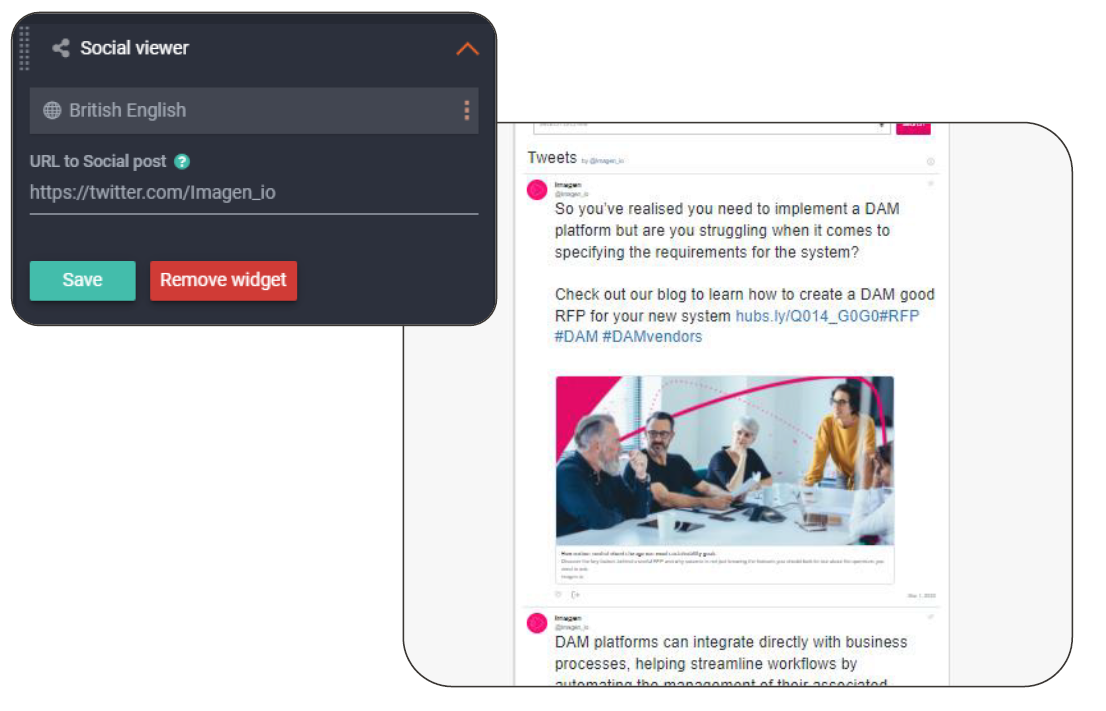

Β 

Β 

Spacer

Allows you to inject horizontal margin space between widgets
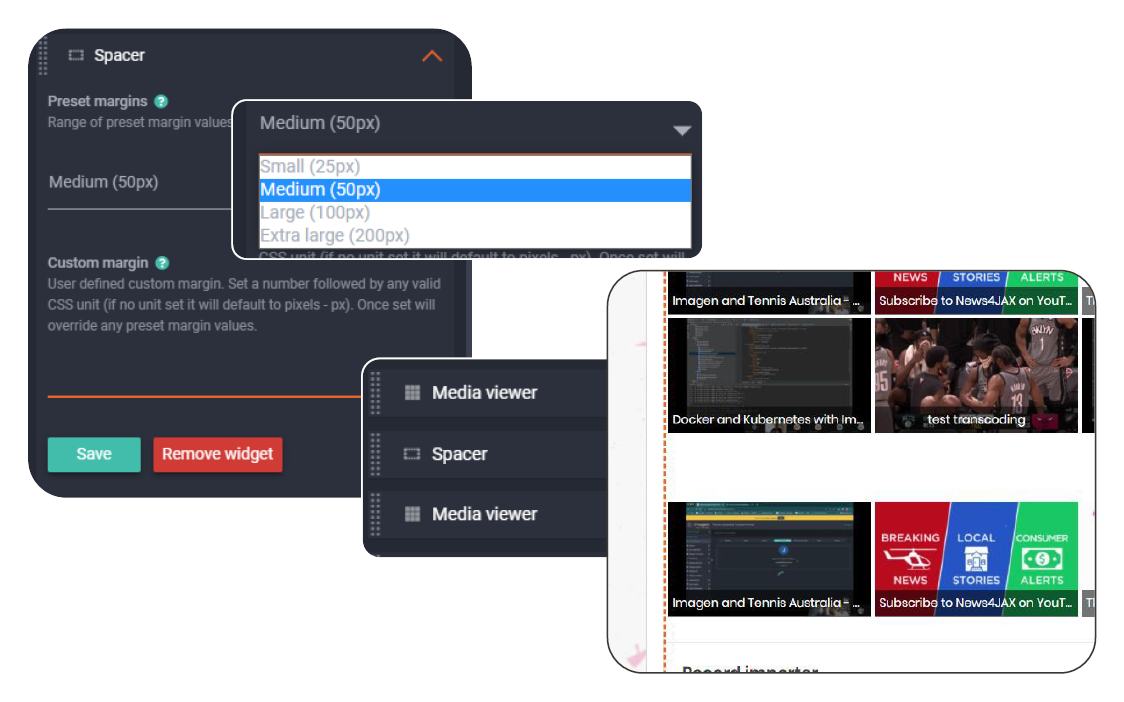

Β 

Β 

Template

The template widget allows you to build rich text wording with a user-friendly interface (with options such as bold, insert image and more); this allows you to create content without the need for HTML coding skills but also offers an advanced editor where you can choose to write HTML
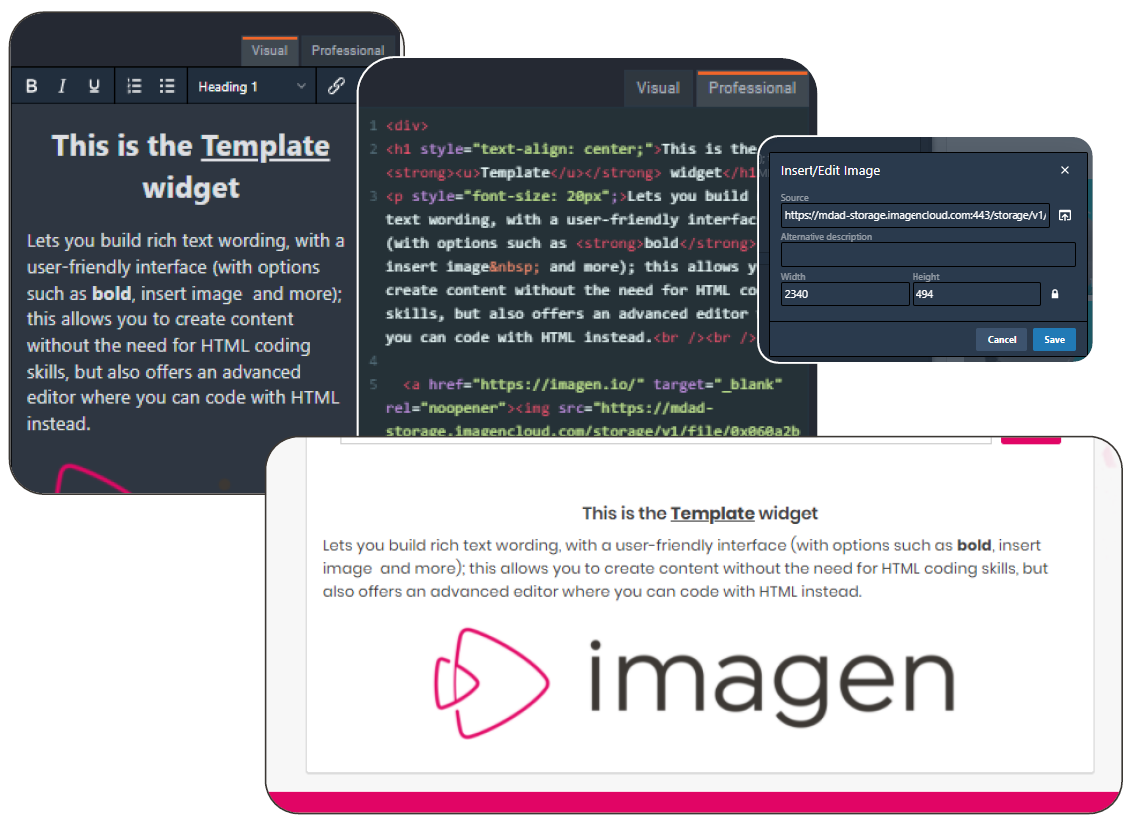

Β 

Β 

Twitter Timeline

Easily adds a public Twitter profile’s timeline just from a username. Options for light and dark themes as well as embed and width/height
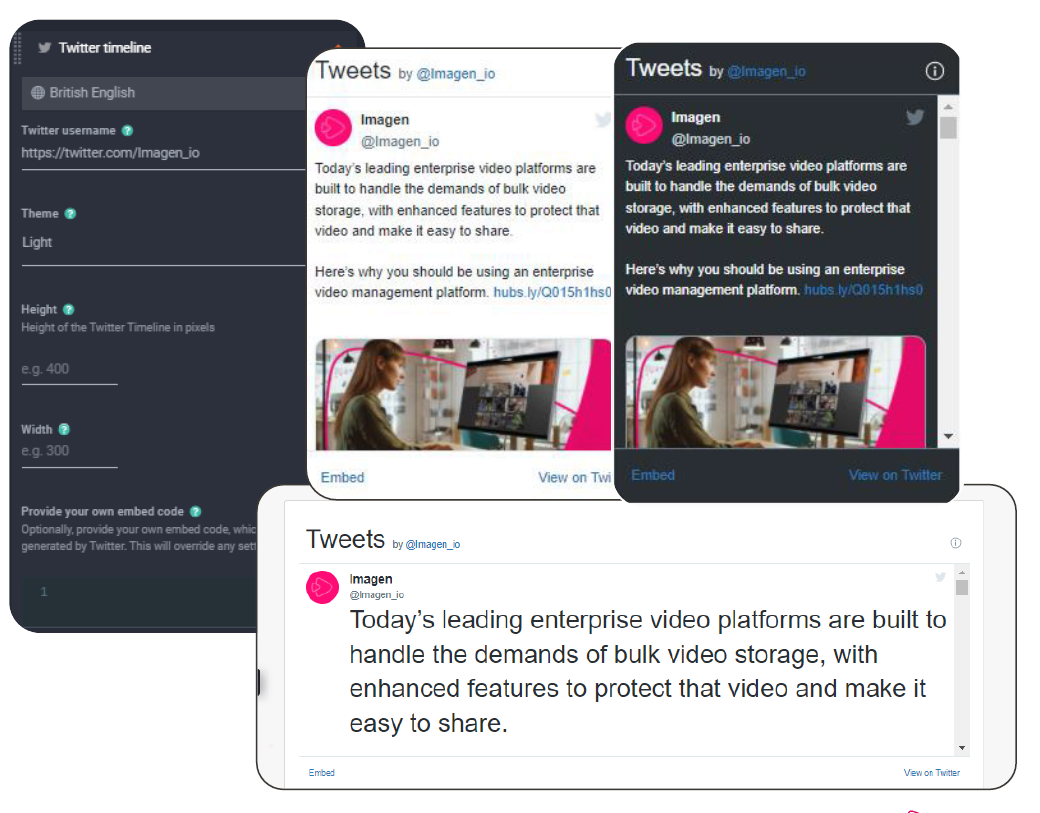

Β 

Β 

Video Player

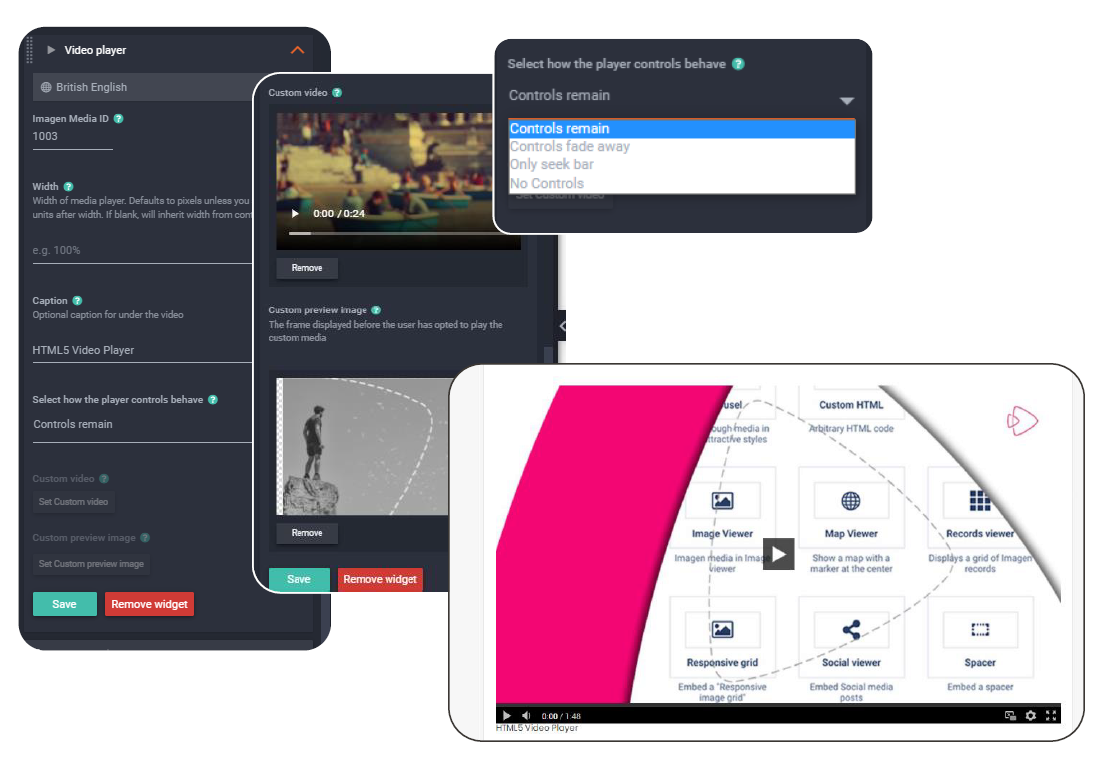
Lets you embed a video from your platform into a page on your system. Handy if promoting an event or sharing a how-to video guide hosted on your platform. Video content can be an Imagen media item or custom uploaded video from the web Media Library

On this day

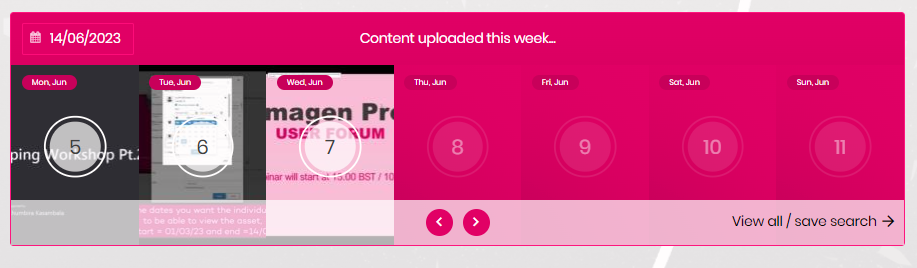
This widget is designed to offer a visual timeline for your content. This will show the number of records with a matching date and can be added as a saved search
πŸ’‘Pro tip: why not look at our guide on (coming soon!)

Β 

Accessibility πŸ‘Welcome to Imagen!Automated transcription (Speech-to-Text) πŸ‘¨β€πŸŽ“Welcome to Imagen!Developers' Guide πŸ“• πŸ”’Welcome to Imagen!How We Can Help You Onboard Your Content πŸ“•Welcome to Imagen!Introduction to Imagen πŸ“•Welcome to Imagen!Onboarding Guide πŸ“•Welcome to Imagen!The Imagen Transcoder Farm πŸ“•Welcome to Imagen!The Imagen Video Player πŸ“•Welcome to Imagen!Storage Availability πŸ€”Welcome to Imagen!Storage Options πŸ€”Welcome to Imagen!Storage Security πŸ€”Welcome to Imagen!Which Theme Is Right for Me πŸ€”Welcome to Imagen!Why Is User Experience So Important? πŸ€”Welcome to Imagen!Imagen Term Glossary πŸ“°Welcome to Imagen!Supported Browsers πŸ“°Welcome to Imagen!Video Player Keyboard Shortcuts πŸ“°Welcome to Imagen!What is a Media Object Timeline πŸ‘©β€πŸŽ“Welcome to Imagen!Newbie Checklist πŸ‘‹Welcome to Imagen!Activity History ⚑FindGoogle Analytics πŸ‘©β€πŸŽ“FindAdding Annotations to Your Video Content ⚑FindAnnotation Layers πŸ“•FindAnnotations GuideπŸ“•FindExporting Annotations ⚑FindGenerate Subtitles for Audio Content ⚑FindGenerate subtitles for video content ⚑FindGrouping Annotations on Export ⚑FindImagen Subtitle Guide πŸ“•FindReordering Objects Within a Collection πŸ“•FindCustom ReportingFindHow can I see the Open-Source Programming Languages used by Imagen? πŸ€”FindIf I search on the homepage, I get one type of search URL. But I get a different kind of URL on the "Search Results Page" πŸ€”FindMy search results seem out of date ⚠️FindWhat metadata does Imagen extract from my video content? πŸ€”FindImagen Query Language - Media Viewer Widget ⚑FindImagen Query Language Reference πŸ“°FindUnderstanding Imagen Query Language πŸ‘¨β€πŸ«FindArtificial Intelligence ServicesFindDescriptive Metadata Fields πŸ“•FindExtracting Image Metadata on Import ⚑FindField Types and Record SchemaΒ πŸ“•FindImagen Query Language - Related Records View ⚑FindImagen Query Language Guide πŸ“•FindImagen XML Schema Mapping (XSLT) πŸ“•FindSingle/multi-select fields - remote validationFindActivate a Language license ⚑FindChange My Default Language ⚑FindDisplay Multilanguage Annotations ⚑FindHow to configure multilanguage logos ⚑Findlanguage packs πŸ“•FindCreating Parent/Child Field DependenciesFindDeleting RecordsFindRecords & Media Objects πŸ“•FindUpdating Records ⚑FindAdd Fields to the Search Index ⚑FindAdding a filter to the search page ⚑FindAdvanced Search Reference πŸ“°FindSaved Searches πŸ“•FindSearch Index Guide πŸ“•FindUpdating the Imagen Search Index ⚑FindBespoke Ingestion πŸ“•StoreWhat is a 'Watchfolder'? πŸ“•StoreImport from Dropbox ⚑StoreImport from OneDrive ⚑StoreUsing the Record (XML) Import Widget ⚑StoreCan non-media file types still be uploaded to Imagen?πŸ€”StoreCreate a record with media ⚑StoreCreate an empty record with metadata ⚑StoreCreate Imagen XML in Excel πŸ‘©β€πŸŽ“StoreCreateΒ multiple records, each with a single piece of media ⚑StoreImagen Media Workflows πŸ“•StoreImport Media from a URL ⚑StoreMedia Import and Ingestion πŸ“•StoreOptions for Onboarding your Metadata and Media πŸ€”StorePFR (Partial File Restore) and Segments πŸ“•StoreWhat information do you store about my video during ingest? πŸ€”StoreBurnt-in Timecodes (BITC) πŸ“•StoreThe Imagen Image Editor ⚑StoreWatermarking ⚑Store.PDF ViewerStoreAdd a Document Viewer ⚑StoreConfiguring Amazon S3 Intelligent-TieringStoreStorage Costs πŸ“•StoreStorage Profile Reference πŸ“„StoreStorage Replication 🌐StoreSupported File Types πŸ“°StoreConfiguring Amazon S3 Storage TutorialStoreConfiguring Wasabi Storage TutorialStoreStorage LocationsStoreWhy Has My Media Failed to Ingest to Wasabi? πŸ€”StoreConfiguring "Download Profiles" ⚑DistributeInstalling and Using Imagen Accelerated File Delivery (AFD) ⚑DistributeOrdering Clips on Behalf of Other Users πŸ“•DistributeEdit Live Stream Notification Emails ⚑DistributeImagen Live Connect API πŸ“°DistributeAd-hoc PaymentsDistributeIntroduction to Content Licensing πŸ“•DistributePrep: Imagen License and Stripe Accounts ⚑DistributeShopping Basket ConfigurationπŸ“„DistributeShopping BasketsΒ πŸ“•DistributeSubscription Configuration ⚑DistributeSubscription Overview πŸ“•DistributePOST /iweb/v1/notification πŸ“°DistributeAnonymous Sharing Links to Collections (Septeber Release)DistributeCollections πŸ“•DistributeEmbedding Media on External SitesDistributeShare media with unregistered usersDistributeSocial Media PublishingDistributeSunrise/Sunset Dates for Open Access Links ⚑DistributeCreate an MRSS Feed ⚑DistributeImagen Live Connect πŸ“•DistributeImagen MRSS Feed Response πŸ“°DistributeOver the top (OTT) Delivery πŸ“•DistributeBatch Editing Record & Media ACLManageCustom ACLsManageSet When Your Users Can Access Your Content ⚑ManageSetting Default Access Control Lists (ACL) for Records, Media, and Collections ⚑ManageSetting Record & Media Access Control Lists (ACL)ManageWhat are "ACLs"? πŸ€”ManageChanging Your Theme ⚑ManageDisplay banners on your site πŸ‘©β€πŸŽ“ManageI want to add a theme, which is right for me πŸ€”ManagePreview a theme before you commit ⚑ManageAdding Users to Groups ⚑ManageSet Permissions for a Group of Users ⚑ManageDynamic form ⚑ManageImagen Query Language - The Carousel Widget ⚑ManageMap Viewer Widget ⚑ManageWidgets πŸ“•ManageAdobe Premiere Pro IntegrationManageCache Page πŸ“„ManageCookies Page πŸ“°ManageDisplay Fields πŸ“„ManageEmail πŸ“„ManageEnvironment PageπŸ“°ManageFederations πŸ“°ManageGeolocation database πŸ“°ManageGlobal Settings Page πŸ“„ManageHealth Check Page πŸ“°ManageMailing List πŸ“„ManageMaintenance Mode πŸ“„ManageThe Imagen Admin Interface Directory πŸ“‹ (Private)ManageUpdate Page πŸ“°ManageUser Intelligence πŸ“•ManageCreate an OrganisationManageAdding users to user groups through organisations ⚑ManageConfiguring Federated SSO ⚑ManageConfiguring your SSO service provider ⚑ManageGuide to SSO πŸ‘©β€πŸ«ManageI'm being sent back to ImagenWeb from the IDP but I can't get any further πŸ€”ManageCustom Cookie Policy (Javascript) TutorialManageImagen Event ServiceManageBanning a User from Site Access ⚑ManageClear Users That Have Not Been ValidatedManageCreate a Custom Registration ProcessManageCreating Custom Registration FieldsManageCreating request/approval relationships ⚑ManageCustomizing your Login Page ⚑ManageGrant a User Administrator PermissionsManageGrant a User Developer PermissionsManageGranting Site Permissions to an Individual User ⚑ManageGuide to Building Access Control πŸ“•ManageIntroduction to Users, Groups, and Organisations πŸ“•ManageManage Permissions with Imagen πŸ“•ManagePreview Only AccessManageRestrict user sign-ups by geographyManageSetting User Signup RulesManageUser Permissions πŸ“°ManageHow do I add reCAPTCHA to my Imagen siteManageCore REST Interface πŸ“°DevelopersGET /api/v1/endpoints πŸ“°DevelopersGet /core/v1/application πŸ“°DevelopersGET /imcc/v1/job/list πŸ“°DevelopersGET /licenceStatus/πŸ“° WIPDevelopersGET /user/ πŸ“°DevelopersGET history πŸ“°DevelopersGET imcc/v1/job/count πŸ“°DevelopersGET job/searchπŸ“°DevelopersGET rights πŸ“°DevelopersPut /imcc/v1/job πŸ“°DevelopersAuthentication via Signed StringπŸ“°DevelopersHow to authenticate API calls with a Bearer token πŸ“°DevelopersCreating an Application in Imagen ⚑DevelopersGaining a Bearer Token ⚑DevelopersGET /iweb/v1/search πŸ“°DevelopersImagen API Documentation πŸ“• πŸ”’DevelopersGET /iweb/v1/notifications πŸ“°DevelopersGET Profiles πŸ“°DevelopersExample MRSS Reader (Powershell) πŸ“„DevelopersImagen XML Reference πŸ“°DevelopersNew metadata-only record with no media πŸ“°DevelopersNew record with a single piece of media πŸ“°DevelopersNew record with multiple pieces of mediaπŸ“°DevelopersRecord update adding new mediaπŸ“°DevelopersRecord update with metadata only πŸ“°DevelopersSet ACL by XML πŸ“°DevelopersGET /import/record πŸ“°DevelopersGET /iweb/v1/download πŸ“°DevelopersPUT /import/record/ πŸ“°DevelopersCreating a Video Record with the Imagen API πŸ‘©β€πŸ«DevelopersFind the UMID of a media file πŸ‘©β€πŸ«DevelopersHow to find an Import Record (job) GUID πŸ‘©β€πŸ«DevelopersHow to find your Media Control Centre FQDN ⚑ πŸ”’DevelopersHow to find your media ID πŸ‘©β€πŸ«DevelopersHow to Find Your Resource Group Name πŸ‘©β€πŸ«DevelopersProgrammatic API Call Examples πŸ“°DevelopersScopes πŸ“°DevelopersStandard Failure Response πŸ“°DevelopersWhat is a job priority? πŸ‘©β€πŸ«DevelopersDELETE /import/record/ πŸ“°DevelopersDELETE /media πŸ“°DevelopersGET /iweb/v1/users πŸ“°DevelopersWebhooksDevelopersXML Watch Folder Tutorial (Lambda) πŸ”’Partners & InternalDELETE /imcc/v1/media/ πŸ“° πŸ”’Partners & InternalDELETE /imcc/v1/record/ πŸ“° πŸ”’Partners & InternalDELETE imcc/v1/import/record/ πŸ“° πŸ”’Partners & InternalGET imcc/v1/import/record/ πŸ“° πŸ”’Partners & InternalGET imcc/v1/record/search πŸ“° πŸ”’Partners & InternalGET record/validateSearch πŸ“° πŸ”’Partners & InternalPUT imcc/v1/import/record/ πŸ“° πŸ”’Partners & InternalAdd a Video Player ⚑ πŸ”’Partners & InternalAdd an Audio Player ⚑ πŸ”’Partners & InternalAdd an Image Viewer ⚑ πŸ”’Partners & InternalMake a clip from a live feed in progress ⚑ πŸ”’Partners & InternalImagen Deployment Tutorial πŸ”’Partners & InternalWatchfolder Tutorial (Azure Function Media Uploaded Trigger) πŸ”’Partners & InternalWatchfolder Tutorial (Azure Function XML Uploaded Trigger) πŸ”’Partners & InternalOnboarding Playbook πŸ”’Partners & InternalJob and File Status Codes πŸ“„ πŸ”’Partners & InternalAdd a subtitles workflow to Imagen ⚑ πŸ”’Partners & InternalCreate a New Empty Workflow ⚑ πŸ”’Partners & InternalRest Plugin Setup for Vantage Integration πŸ‘©β€πŸ”¬ πŸ”’Partners & InternalWatch Folder With FTPS Tutorial πŸ‘¨β€πŸ« πŸ”’Partners & InternalXML Watch Folder Tutorial (Windows) πŸ”’Partners & Internal